
MediaSnap Introduction Storybook
MediaSnap
The AI Media Production Studio for films, ads, visual stories, cinematic content, and reusable creative assets.
Bring your idea to life inside one production system.
Why MediaSnap Exists
AI creation is powerful. But production is still broken.
Today, creators can generate images, videos, voices, music, scripts, and edits faster than ever before.
But the real problem is not generation.
The real problem is production.
Creators are forced to jump between disconnected tools. One tool writes the script. Another creates images. Another generates video. Another edits the timeline. Another stores files. Another manages prompts.
The result is not a creative workflow. It is prompt chaos.
The MediaSnap Answer
MediaSnap turns AI creation into a production system.
MediaSnap is not just another AI generator.
It is a project-based AI Media Production Studio designed to organize the entire creative process from the first idea to the final exported result.
Every project becomes its own independent production workspace. It keeps its scripts, scenes, shots, characters, locations, props, generated media, conversations, settings, and timeline structure together.
MediaSnap project workspace
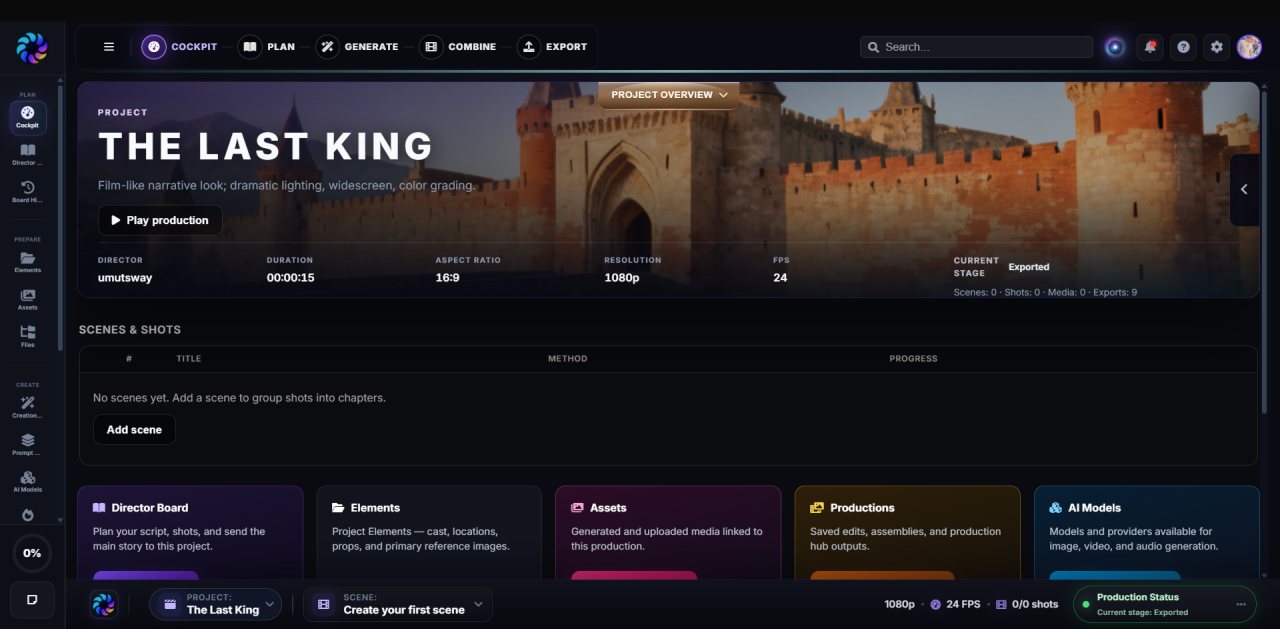
Instead of creating random isolated outputs, MediaSnap helps creators build complete productions with structure, continuity, and reusable creative intelligence.
The Core Workflow
PLAN → GENERATE → COMBINE → EXPORT
MediaSnap follows a simple production path that mirrors how real creative work happens.
MediaSnap does not ask creators to think like prompt engineers. It helps them think like directors.
PLAN
The Director Board
Most AI tools begin with a prompt box.
MediaSnap begins with the Director Board.
The Director Board is where your raw idea becomes a structured production. It is where scripts become scenes, scenes become shots, and creative ideas become reusable production elements.
Inside the Director Board, you work with Snap AI your built-in creative co-director.
Director Board — script, scenes, and shot panel
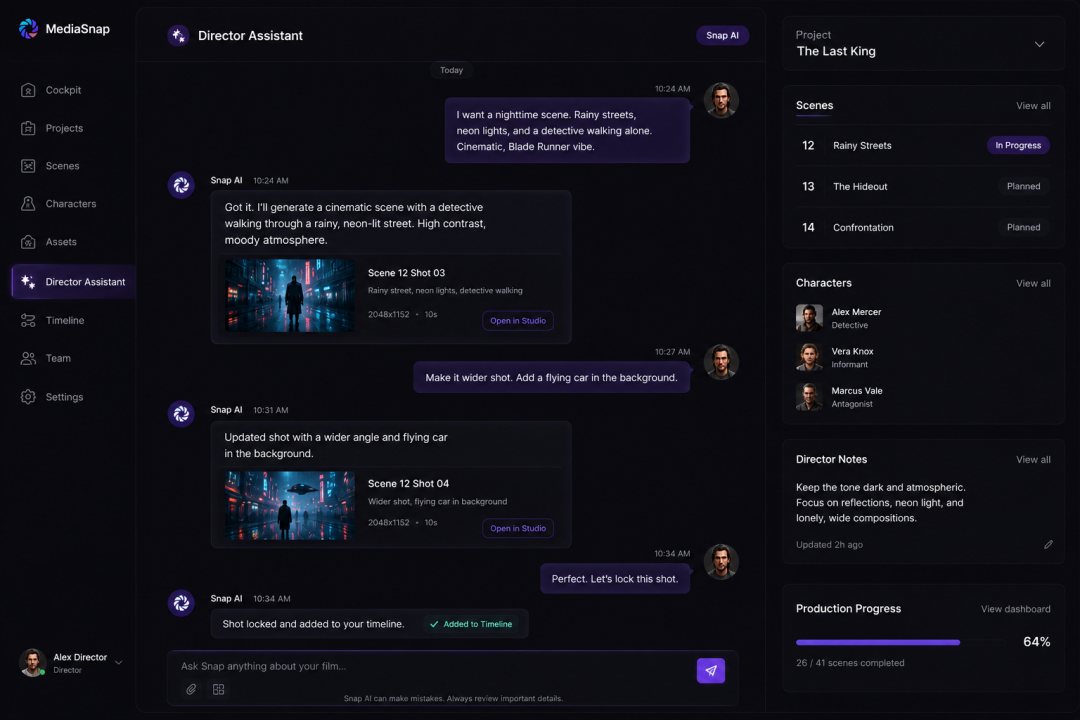
You do not need complicated commands. You simply describe what you want, and Snap helps you shape the production step by step.
Director Board Flow
Start with a simple idea.
A production can begin with one sentence.
Snap
Snap
Snap is not only writing text. It is beginning to understand the creative world of the project.
The tone, lighting, character direction, product mood, and visual language become part of the project context.
Script Creation
Snap turns the idea into a production script.
Once the creative direction is clear, Snap creates a script that is already structured for production.
Snap
Scene 1 Morning Light
Scene 2 Silk & Reflection
Scene 3 Perfume Reveal
Scene 4 Emotional Closing
Snap
This is where MediaSnap becomes different from a normal chat assistant.
The output is not only prose. It becomes production structure.
Automatic Structure
Scripts become scenes, shots, and production elements.
As the script evolves, MediaSnap can detect and organize the important building blocks of the production.
Snap
Character: The Woman
Location: Luxury Bedroom
Location: Marble Bathroom
Prop: Perfume Bottle
Prop: Silk Drapes
Prop: Gold Mirror
Instead of manually building a library after writing, MediaSnap helps the project organize itself as you create.
Elements & Consistency
Snap builds consistent production elements.
In AI production, consistency is one of the hardest problems.
MediaSnap solves this by turning recurring people, places, and props into project elements.
Snap
Name: Sophia
Visual style: Elegant luxury fashion aesthetic
Mood: Soft, emotional, premium
Wardrobe: Light silk robe, natural makeup, warm cinematic tones
Would you like me to generate multi-angle consistency references?
Now the project has a reusable visual anchor. Future generations can reference the same character instead of reinventing her every time.
Plan Completion
By the end of PLAN, the production is ready.
Before generating anything, MediaSnap helps you create a real production foundation.
- A complete script
- Organized scenes
- Shot-by-shot visual structure
- Consistent characters
- Locations and sets
- Props and objects
- Creative direction
- Prompt context for future generation
The project is no longer an idea. It is a production blueprint.
Director Board — script, scenes, and shot panel
GENERATE
Turn structured shots into real media.
Once the script, shots, and elements are ready, you move from planning into creation.
Because MediaSnap already understands the project, generation becomes easier and more consistent.
Snap
I’ll use Sophia as the character reference, Luxury Bedroom as the environment, and golden morning light as the visual direction.
Do you want soft luxury realism or more cinematic fashion-commercial styling?
Snap
Instead of repeating the same context manually, Snap carries the production memory forward.
Review & Improve
Generate, review, refine, connect.
Every generated result appears inside the MediaSnap workspace where you can review it visually.
If the result is not strong enough, you refine it with Snap.
Snap
slower camera push-in
softer facial expression
warmer light bloom
more elegant movement
less aggressive motion
Snap
This connection matters. The media is no longer a random file. It belongs to a specific production shot.
Shot Tracking
Your production fills itself visually.
As generated clips are connected to shots, the project becomes a live production tracker.
- Completed shots are visible.
- Missing shots are easy to identify.
- Approved results stay attached to their story context.
- Regeneration remains organized.
- The entire film becomes measurable.
Shot tracker — approved media connected per shot
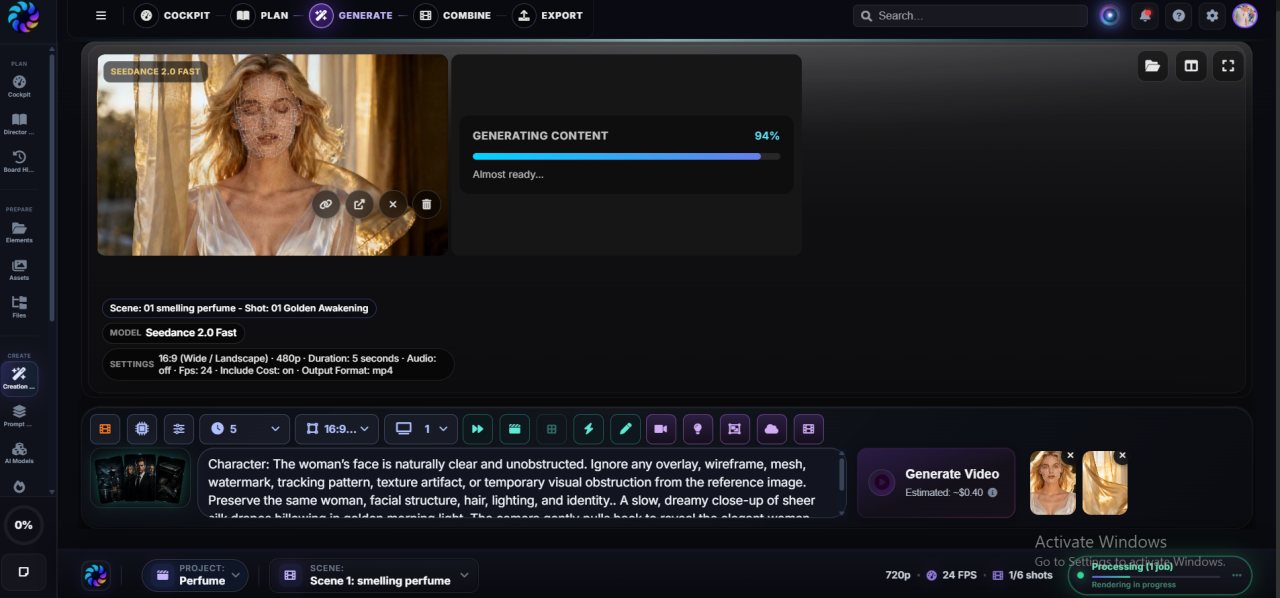
MediaSnap replaces creative disorder with production clarity.
COMBINE
Production Studio: the timeline for AI productions.
Once your shots are generated and connected, MediaSnap moves into the combine stage.
This happens inside Production Studio, a layered visual timeline editor designed for assembling AI media into finished productions.
Think of it like a CapCut, Leonardo-style, or Premiere-inspired editing experience but connected directly to your MediaSnap project.
Production Studio — layered timeline editor
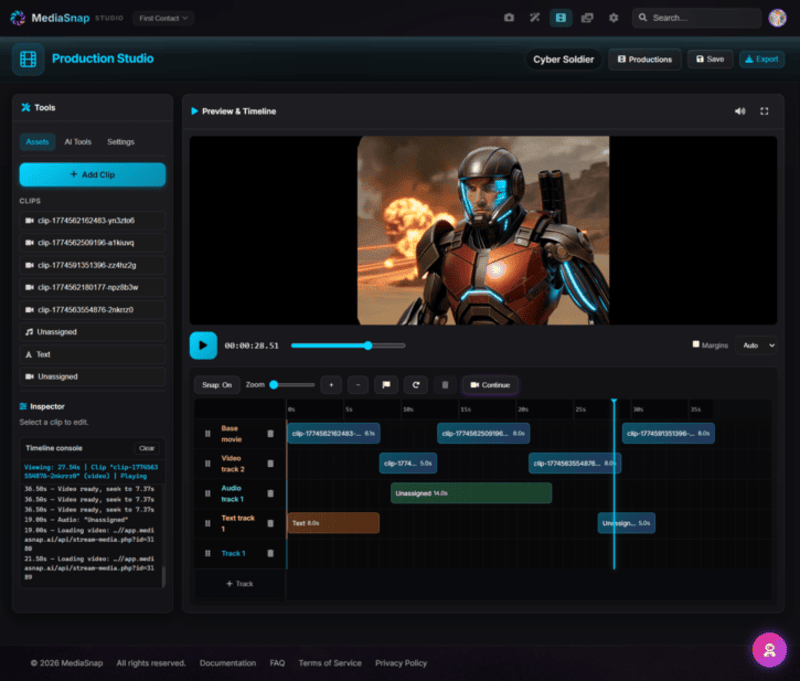
You are not exporting random clips to manually rebuild the project elsewhere. Your shots, story, media, and production context stay connected.
Timeline Editing
Drag, drop, layer, polish.
Inside Production Studio, creators can assemble the final production visually.
For AI creators, this is important because generation is only part of the work.
The final feeling of a film, ad, or cinematic video comes from timing, pacing, rhythm, sound, and assembly.
EXPORT
Export the final production with one click.
When the timeline is ready, MediaSnap exports the final result.
Your finished production can become a shareable video, commercial, cinematic short, trailer, social media asset, or campaign piece.
Export center — MP4 render and project bundle
But MediaSnap does not stop at final video export.
MediaSnap can also export the entire production like source code.
Project Bundles
The source code of your production.
A MediaSnap bundle packages your complete creative project into one portable zipped file.
This bundle can include:
- Project structure
- Scripts
- Scenes and shots
- Snap AI conversations
- Characters and elements
- Locations and props
- Prompt logic
- Generated images and videos
- Timeline setup
- Production settings
This means a finished MediaSnap production is not only a video. It can become a reusable creative system.
Creator Economy
Import, remix, reuse, sell.
Other creators can import your MediaSnap bundle into their own panel.
When they import it, the production comes back to life inside their workspace.
- Scenes are restored.
- Shots are restored.
- Characters reconnect.
- Prompts remain visible.
- Generated media becomes available.
- The timeline can be edited again.
This opens the door to a marketplace of reusable AI productions.
A creator can sell not only the final video, but the production system behind the video.
Who MediaSnap Is For
Built for the new generation of AI creators.
MediaSnap is for creators who want more than isolated AI generations.
It is for people who want to build repeatable production workflows.
The Future
MediaSnap is building the production layer for AI media.
AI models will keep improving.
Images will become better. Videos will become longer. Voices will become more realistic. Editing will become faster.
But creators will still need structure.
They will need projects. Context. Consistency. Timelines. Reusable workflows. Collaboration. Export systems. Marketplaces.
MediaSnap is not just where AI media is generated.
It is where AI media is produced.